Payers: verified by portal, then phone
Automated insurance verification for Delta Dental plans
Ardent runs playbooks for 42 Delta Dental member companies, Delta Dental of California among them. For each scheduled patient on a Delta Dental plan it signs into the provider portal with your practice’s credentials, reads the benefit grid field by field, keeps the portal record and screenshots as the source for every value, and phones the provider line only for the required blanks the portal leaves open. The answers go onto the breakdown sheet your office already uses, and the PDF is filed in the patient’s chart before the visit.
- Playbooks for 42 Delta Dental member companies, each its own payer with its own portal.
- Portal first, with your own provider credentials; the emailed one-time code is read from a mailbox you designate.
- Every value keeps its source: the portal record and a screenshot, or the rep’s recorded words.
- A recorded phone call only for required blanks still open, up to two calls, every answer backed by a quote.
- Never writes into your PMS coverage tables: the sheet as a PDF in the chart, and a one-line note where the PMS allows.
How it works
How does Ardent verify Delta Dental benefits?
Delta Dental answers by portal, so that is where the playbook starts. Ardent signs into the member company’s provider portal with your credentials, reads the benefit grid through the portal’s own data rather than a model’s reading of the screen, and captures the payer’s documents and screenshots as evidence. Whatever required blank the portal leaves open goes to a phone call to the provider line, and the agent fills it only when a quote from the rep backs it.
- Sign in. With your practice’s provider portal credentials. They live only for the duration of the call that needs them and never enter a model, a log line or a response.
- One-time code. Where the portal emails a code, Ardent reads it from the mailbox your office designates for that purpose. SMS and authenticator-app codes are not supported; those payers move to the next channel in the playbook.
- Benefit grid. Read field by field: maximum and remaining, deductible, coverage percentages by category, frequency and age limits, waiting periods, the missing tooth clause, ortho, and history where the portal shows it.
- Evidence. The payer’s own documents and the portal screenshots are kept with the check and tiled behind the sheet in the filed PDF.
- Phone for the rest. Only for required blanks still open. The agent dials the provider line inside Delta Dental’s business hours, works the menu to a rep, asks your sheet’s questions, and writes an answer only with a quote behind it.
- Filed. Values typed into your blanks in your notation, the PDF filed into the patient’s chart documents, a note on the appointment where the PMS allows.
On the phone
What does Ardent ask Delta Dental on the phone?
Only what the portal did not answer. In the illustrative call on the home page, a fictional patient on a Delta Dental of California PPO, the portal had answered every row but two, so the call is short. Illustrative call: fictional patient, fictional rep, not a recording.
- Ardent: "Hi, I’m an AI assistant calling on behalf of a dental office, and this call may be recorded. I’m verifying dental benefits for a patient: member ID D-D-C, one-zero-four, seven-seven-eight, two-three, date of birth April 14, 1992."
- Payer rep: "Okay. I have Jordan Avery, active, effective January 1, 2026. What do you need?"
- Ardent: "Only two things. Your portal answered the rest. First, the frequency limitation on a crown, D2740. Second, whether there is a waiting period between a prophy and periodontal maintenance."
- Payer rep: "Crowns are once every five years." Ardent asks whether that is per tooth or any crown. "Per tooth. Five years per tooth." The MAJOR row gets D2740 FREQ 1x60m/tooth, with the quote behind it.
- Payer rep: "And on your second question, there’s no waiting period between those." The PERIO row gets WAITING PERIOD AFTER PROPHY/PERIO: NONE, with the quote behind it.
On the sheet
What lands on your sheet for a Delta Dental patient?
Your own worksheet, in your notation. For the fictional patient above: a $2,000 maximum with $1,650 remaining, a $50/$150 deductible, diagnostic and preventive at 100%, basic at 80%, major at 50%, sealants to age 16 and fluoride to 19, a $1,500 orthodontic lifetime maximum, prior extractions covered, and the two phone answers, D2740 once per 60 months per tooth and no waiting period after prophy or perio. Every printed value carries its source: the portal record, the insurance on file in the chart, or the rep’s recorded words. A blank nobody stated stays blank.
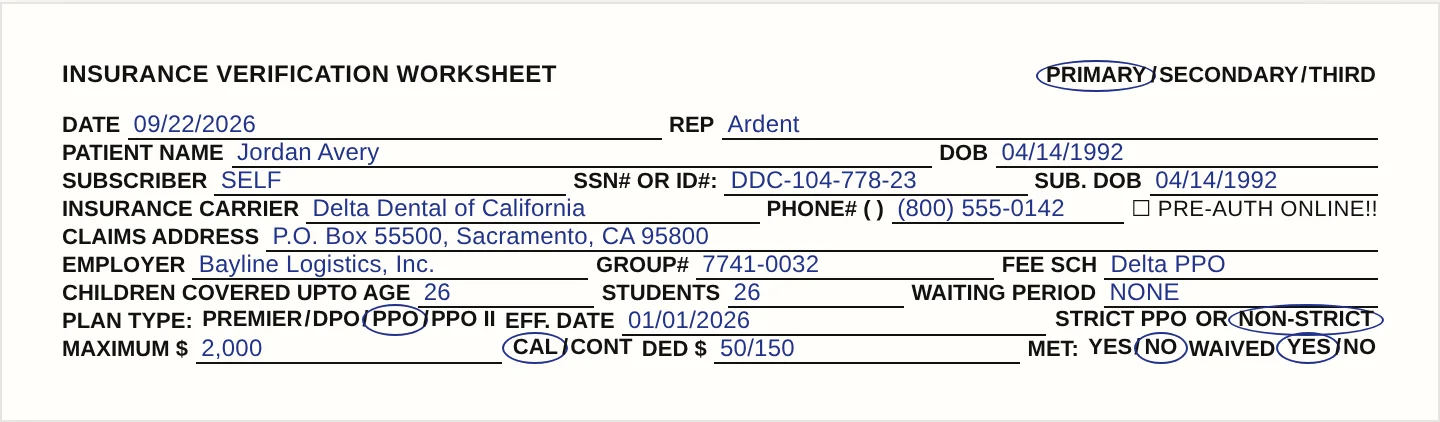
Sample data, fictional patient. Watch a breakdown fill in on the home page.
The exceptions
What happens when a Delta Dental plan can’t be verified?
The morning email says so, in plain words. In the fictional example on the home page, Delta Dental of California shows a dependent’s plan ended on 08/31/2026, so the appointment reads "Needs info", the appointment note in the PMS says "Delta Dental of California shows this plan ended 08/31/2026. Ask the patient for current coverage," and the 7:00 AM email lists the visit with that reason. Nothing is guessed. When the portal cannot match the patient to the insurance on file, the plan has ended, or a required blank stays open after the call, the appointment is set to "Needs info" or "Someone has to call", the reason goes to your front desk in the 7:00 AM email in plain words, and, where your practice management system allows a note, one line goes on the appointment. When the portal is temporarily unavailable the check is retried at the next 6:00 AM run, and failures that will clear on their own retry after 6 and 48 hours.
Answers
Delta Dental insurance verification FAQ
Ardent operates playbooks for 42 Delta Dental member companies, including Delta Dental of California. Each member company is its own payer with its own provider portal, so each has its own playbook. If a patient’s Delta Dental company is not among the 42, the appointment is named in the 7:00 AM email as a payer Ardent cannot check yet rather than left blank; ask about your patients’ companies on the demo call.
Yes, for portal automation. Credentials live only for the duration of the call that needs them and never enter a model, a log line or a response; every portal request is limited to that payer’s domain; the emailed one-time code is read from a mailbox you designate; Ardent never solves CAPTCHAs. SMS and authenticator-app two-factor codes are not supported, and for those payers the check moves to the next channel in the playbook or stops and says so.
Only for required blanks the portal leaves open. The agent dials the provider line inside Delta Dental’s business hours, works the menu through to a rep, asks your sheet’s questions, and writes an answer only when a quote from the rep backs it. Up to two calls per run. The call is recorded and disclosed as recorded on the call, and the agent states that it is an AI.
The completed sheet as a PDF in the patient’s chart documents, named insurance-eligibility-<first>-<last>.pdf, with Delta Dental’s own documents and the portal screenshots behind it. On Dentrix, Dentrix Enterprise, Eaglesoft and Open Dental, one line on the appointment when something on file needs fixing; on CareStack, a coverage line with an estimated copay. Ardent never writes into coverage tables.
Whatever the portal states. The general worksheet’s plan-type row (Premier, DPO, PPO, PPO II) is circled from the portal record, and the fee schedule line records the schedule the portal names, Delta PPO in the fictional example. If the portal does not state a value, the row stays blank rather than guessed.
The appointment is set to "Needs info" instead of verified, the reason goes to your front desk in the 7:00 AM email, and on a PMS that accepts a note one line is added under your own note text: "Delta Dental of California shows this plan ended 08/31/2026. Ask the patient for current coverage." Once the front desk corrects the insurance on file, the next check runs from the corrected details.