
Integrations: connected directly
Automated insurance verification for CareStack
Ardent connects to CareStack directly, with a dedicated login your office creates for it. It reads upcoming appointments and each patient’s insurance on file, verifies benefits with the payer, portal first and a phone call for what is left open, then fills your practice’s own breakdown sheet, files the PDF into the chart, and adds a coverage line with the estimated copay to the appointment.
- Connected directly, with no new software on your server. Ardent uses a dedicated login the office creates for it and works in your own CareStack web app.
- In use at Montclair Pediatric Dentistry in Oakland, on that office’s own pediatric breakdown sheet.
- Writes two things: the finished sheet as a PDF under your document type, and a one-line coverage summary with the estimated copay on the appointment’s Status & Notes, copied to the Patient Memo.
- Never edits CareStack’s insurance or coverage fields; every note is an add, never an edit of what the office wrote.
How it works
How does Ardent work with CareStack?
Ardent signs into your practice’s own CareStack web app with its dedicated login and reads the schedule and the insurance on each patient. For each visit inside the window it checks the payer: the provider portal first, or EDI 270/271 or a faxback where that is the payer’s channel, then an AI phone call for required blanks still open. It draws the answers onto your sheet, uploads the PDF to the chart, and adds the coverage line to the appointment.
What Ardent reads from CareStack
- The schedule: upcoming appointments with their codes and treatment procedures.
- The patient: name, date of birth, patient ID, and the Patient Memo.
- The insurance on file: carrier and plan, subscriber ID, relationship, effective dates, group and employer, and the payer, so Ardent can pick the payer’s playbook.
- The new-patient registration form, when the chart holds no insurance yet. The insurance fields on that PDF are read so the check can still run.
- Your office fees and procedure codes, used only to estimate the copay on the coverage line.
What Ardent writes back to CareStack
| Artifact | Written? | Where and when |
|---|---|---|
| Chart document (PDF) | Yes | Uploaded to the patient’s documents under the document type your office chooses (at Montclair, "Insurance Eligibility Response Document"), flagged non-clinical. Named insurance-eligibility-<first>-<last>.pdf; filed once per appointment. |
| Coverage line | Yes | One new entry on the appointment’s Status & Notes timeline, copied to the Patient Memo. It is an add, never an edit. In the desk’s own shorthand, signed -Ardent. |
| Insurance / coverage fields | No | Never. Plan entry in CareStack stays with the office, done from the filled sheet in the chart. |
Swipe to see the whole table →
The coverage line, for a fictional patient
Copay $42. Elg exam, prophy, bwx, PA, pano. NOT elg IO, fluoride. Copay breakdown: D0350 $42 (not covered) -ArdentSample data, fictional patient. "Elg" lists the services on the visit the plan covers for this patient today; "NOT elg" lists the ones it does not, whether by exclusion, frequency already used or an age limit. A service covered below 100% prints its rate, such as bwx 80%. The copay is estimated from your CareStack office fees and the verified rates; when a rate, deductible or maximum was never stated by the payer, the visit cannot be priced definitively and the copay lead is simply omitted. An inactive plan prints <Carrier> coverage inactive as of MM/DD/YYYY. -Ardent. The figure is an estimate, never a guarantee.
The PDF holds the completed sheet page or pages, then the payer’s own documents the portal preserved and any received fax. The REP blank reads Ardent on an unattended upload; the date is the day the check finished.
Setup
How the connection works
CareStack’s published API has no insurance, schedule or documents read, so Ardent works the way a coordinator would: it signs into your CareStack web app with a login that belongs only to Ardent. Your office creates that login, tells us your CareStack subdomain, the location, and the document type the filed sheets should use. Because the login is Ardent’s own, every action shows in CareStack’s logs, and a lockout never locks out the front desk.
- Create the login. A dedicated CareStack user for Ardent, plus your subdomain, location and the document type for filed sheets. Nothing is installed on a server or a workstation.
- Baseline. Ardent pulls the schedule once and checks counts, dates, patient matching, coverage data and payer mapping with your office.
- Choose the sheet. Your breakdown sheet is measured once. Montclair’s pediatric breakdown and the shared general worksheet are both in production today.
- Switch on, one flag at a time. Hourly polling, watched for a day; then the 6:00 AM ahead-of-visit run; then the 7:00 AM digest; then one sheet uploaded by hand onto a test patient and confirmed in the right chart under the right document type; only then automatic filing and the coverage line.
We do not promise a go-live date; none is documented.
One patient, next week
The sheet, filled.
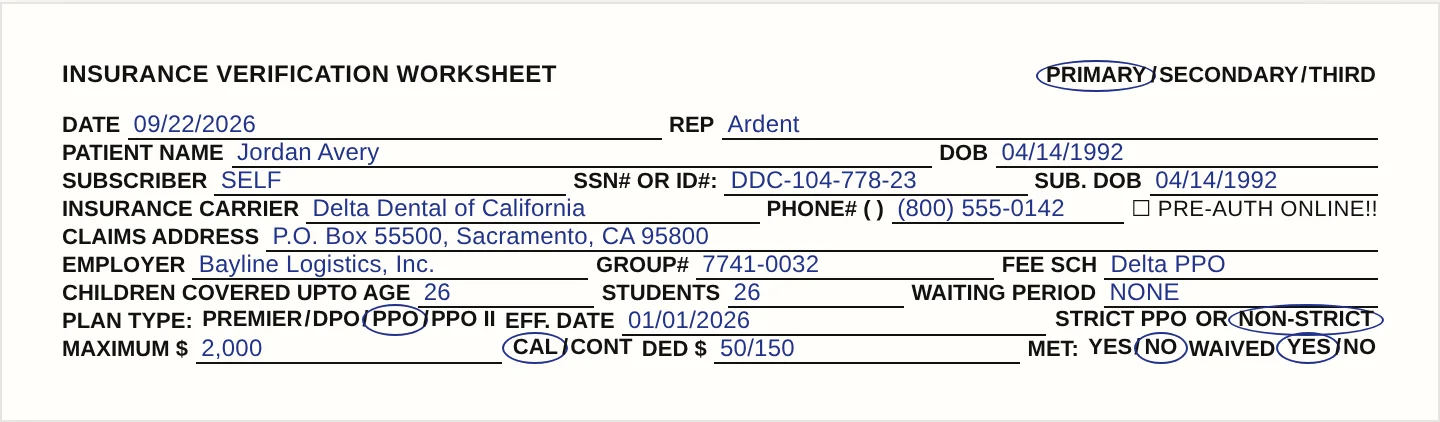
Filed into CareStack as a chart document. Sample data, fictional patient. Watch a breakdown fill in on the home page →
Built-in eligibility
CareStack’s electronic eligibility and Ardent
CareStack includes electronic eligibility for, in its words, any insurance that has the capability for electronic verification. That answers the first question, whether the patient is covered. Ardent answers the sheet: maximum and remaining, deductible and whether it is met, percentages by category, frequencies and payer-stated history, age limits, waiting periods and downgrades. It then prices the visit from those answers. It phones the payer for what the electronic response does not state, and never edits what CareStack or your team writes.
The exceptions
What still needs a person
Anything Ardent could not verify. Every weekday at 7:00 AM your front desk gets one email, with the subject [Ardent Dental] <Office> Insurance Eligibility for <Weekday, Month D>. It lists each appointment Ardent could not verify and why, in plain words: a member ID missing, a plan that ended, a payer Ardent cannot check yet. On CareStack that email and the app carry the reasons; the Status & Notes line is written when a check comes back, an inactive plan included, and not when a check could not run.
A required blank the payer would not state stays blank on the sheet, the appointment is flagged "Someone has to call," and it is in that morning’s email. When every appointment verified, the email says so in one line.
Answers
CareStack insurance verification FAQ
No. Ardent uploads the completed sheet as a PDF under your document type and adds one coverage line to the appointment’s Status & Notes and the Patient Memo. It never edits insurance plans, coverage fields or fee schedules in CareStack, and its notes are always new entries, never edits of what the office wrote.
In the patient’s documents, under the document type your office chooses, which at Montclair Pediatric Dentistry is "Insurance Eligibility Response Document", scoped to your location and flagged non-clinical, since it is front-desk paperwork. The file is named insurance-eligibility-<first>-<last>.pdf, shows REP "Ardent", and is filed once per appointment.
Yes, one dedicated login that only Ardent uses. It keeps Ardent’s actions separate and auditable in CareStack’s own logs, and if that login is ever locked out, nobody at the front desk is. Nothing is installed on your server or workstations. Ardent’s own app users are your staff, on your practice’s email domain.
No, it is an estimate. Ardent prices the visit’s procedures from your CareStack office fees and the rates, deductible and maximum the payer stated. If any of those were not stated, the copay lead is left off rather than guessed. Results are informational; the practice remains responsible for confirming coverage with the payer.
Eligible and not eligible for this patient on this visit, service by service, across exam, prophy, fluoride, bwx, PA, pano and IO, worked out from the payer’s stated frequencies, history and age limits. A child who has not hit the fluoride age limit lands in "Elg"; an adult past it lands in "NOT elg". A service covered below 100% prints its rate, such as bwx 80%.
It does a different job. CareStack’s eligibility check answers "active or inactive" from the payer’s electronic response. Ardent fills your own breakdown sheet blank by blank, phones the payer for what the response leaves open, files the PDF with every value’s source, and prices the visit on the coverage line. Keep CareStack’s check if you use it; Ardent will not touch what it writes.
Some payers key their lookup on the subscriber’s ZIP code, which CareStack’s insurance screens do not carry. For those payers the check stops as "Needs info" rather than guessing, the reason is named in the 7:00 AM email and in the app, and the front desk adds the detail and re-runs. Nothing is inferred from a similar plan or last year’s sheet.
No. On CareStack the Status & Notes line is a coverage summary written when a check comes back, including <Carrier> coverage inactive for a plan that ended. The failure reasons, such as a member ID missing, a plan that ended or a payer Ardent cannot check yet, are listed in the 7:00 AM email and on the appointment card in the Ardent app, with a "Fix & re-run" button.